Legnext - Midjourney API Platform

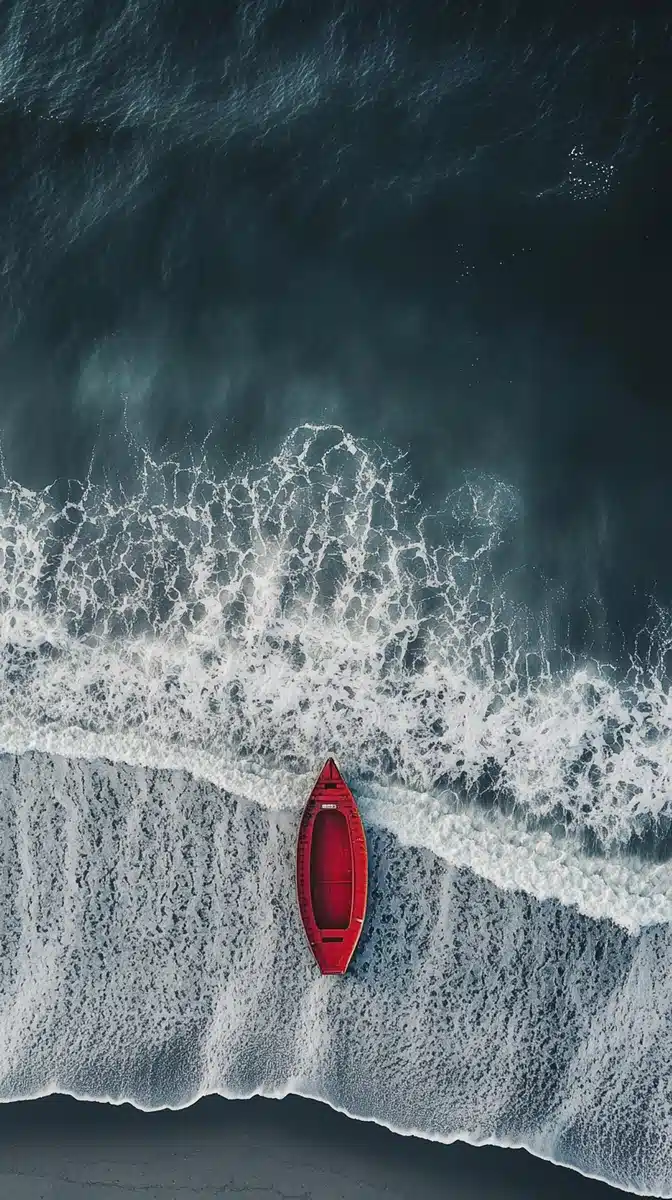
Symmetrical Coastline With Red Boat Midjourney Prompt

分享:

完整提示词

NASA aerial view, coast, beach, silent gray tones, red boat, style wallpaper, symmetrical composition

API 代码示例

Generated image preview

生成的图像预览

curl --location 'https://api.legnext.ai/api/v1/diffusion' \
--header 'x-api-key: YOUR_API_KEY' \
--header 'Content-Type: application/json' \
--data '{
    "text": "NASA aerial view, coast, beach, silent gray tones, red boat, style wallpaper, symmetrical composition"
}'

注意: 将 YOUR_API_KEY 替换为您的实际 API 密钥。从 您的仪表板 获取您的 API 密钥。

如何使用此提示词

概述

此提示词旨在使用 midjourney 生成出色的 AI 图像。无论您是设计师、艺术家还是开发者,此提示词都为创建专业质量的图像提供了坚实的基础,具有精心制作的参数以确保一致的结果。

分步指南

  1. 1
    Copy the Prompt:Click the "Copy" button above to copy the complete prompt text to your clipboard.
  2. 2
    Open midjourney:Navigate to your midjourney interface (Discord bot or web interface).
  3. 3
    Paste and Generate:Paste the prompt into the message box and press Enter to start generating your image.
  4. 4
    Wait for Results:midjourney will process your prompt and generate multiple image variations, typically taking 1-2 minutes.
  5. 5
    Refine if Needed:Use the upscale or variation buttons to refine your favorite results.

自定义技巧

Change the Subject:Replace the main subject with your own concept while keeping the style descriptors.
Adjust Colors:Add or modify color descriptions to match your brand or creative vision.
Modify Style:Experiment with different artistic styles like "watercolor", "oil painting", or "digital art".
Fine-tune Parameters:Adjust the numerical parameters to find the perfect balance for your use case.
Add Context:Include additional details about lighting, mood, or setting to refine the output.

最佳实践

Start with the Base Prompt:Always test the original prompt first before making modifications.
Make Incremental Changes:When customizing, change one element at a time to understand its impact.
Keep a Prompt Library:Save successful variations for future use and reference.
Experiment with Seeds:Use the --seed parameter to maintain consistency across multiple generations.
Use Remix Mode:Enable remix mode in midjourney to easily iterate on successful outputs.

Using with Our API

For developers and businesses looking to integrate midjourney into their applications, our API provides a simple way to generate images programmatically. You can automate image generation, process multiple prompts in batch, and integrate AI image generation directly into your workflow. Check the API Code Example section above for implementation details.

The API handles all the complexity of managing midjourney connections, queuing, and result retrieval, allowing you to focus on building your application. With support for all midjourneyfeatures and parameters, you get the full power of midjourney through a simple REST API interface.

故障排除

Results don't match expectations:Try adjusting the chaos and stylize parameters, or add more specific descriptive words to your prompt.
Image quality is low:Ensure you're using the latest model version (--v 6 or higher) and consider using upscale features for final outputs.
Prompt is rejected:Check that your prompt doesn't contain prohibited content. midjourney has content guidelines that all prompts must follow.
Generation is slow:During peak hours, midjourney may experience higher load. Consider using fast or turbo mode, or try during off-peak times.

常见问题

要使用此提示词,只需复制完整的提示词文本并将其粘贴到 midjourney 中。您也可以使用我们的 API 以编程方式生成图像。提示词包含所有必要的参数以获得最佳结果。
当然可以!请随意自定义提示词的任何部分以匹配您的创意愿景。您可以更改主题、样式、颜色或任何其他元素。参数(如 --ar、--chaos、--stylize)也可以调整以微调您的结果。
常见参数包括:--ar(宽高比,如 16:9)、--chaos(变化级别 0-100)、--stylize(艺术解释 0-1000)、--v(版本号)、--style(渲染样式)。这些有助于控制生成图像的最终输出。
您可以使用我们的 API 自动使用此提示词生成图像。只需向我们的 API 端点发送包含提示词文本的 POST 请求。查看上方的"API 代码示例"部分,了解多种编程语言的实现细节。
提示词本身可以免费使用。但是,生成图像需要 Midjourney 订阅或使用我们的 API 服务。我们的 API 提供了一种便捷的方式,可以将 Midjourney 集成到您的应用程序中,而无需管理 Discord 机器人。
图像使用权取决于您的 Midjourney 订阅计划。一般来说,付费订阅者可以商业使用图像,而免费用户的使用权有限。请查看 Midjourney 的服务条款以了解具体细节。

想在您的应用中使用此提示词?

使用 Midjourney API 生成图像 - 无需 Discord 账户