
Enchanted Velvet Opera Gloves Midjourney Prompt
Полный Промпт
Elegant, enchanted opera gloves floating gracefully against a plain dark green background. The gloves are long and velvet-textured, richly embroidered with fine golden thread in delicate celestial and botanical patterns. Subtle magical animation: golden embroidery glows faintly, tiny stars twinkle, and embroidered vines gently sway as if alive. The gloves exude fantasy couture elegance, with soft sparkles drifting from the fabric. No extra props or distractions the focus is entirely on the detailed, enchanted gloves with a clean, cinematic aesthetic. 8k --chaos 35 --ar 9:16 --v 7 --stylize 350 --profile de2zyv8Parameter Guide
This prompt uses 4 parameters to control the generation.
Aspect Ratio
9:16Vertical format - optimized for mobile screens, Instagram Stories, and TikTok
Mobile-first content
Model Version
v7V7 is the latest and most capable Midjourney model with superior prompt understanding and coherence.
Stylization
350High stylization - strong artistic interpretation for creative work
Chaos
35Moderate chaos - good variation while maintaining core concept
To modify these parameters, copy the prompt above and adjust the values. For example, change --ar 16:9 to --ar 1:1 for a square image.
Пример Кода API
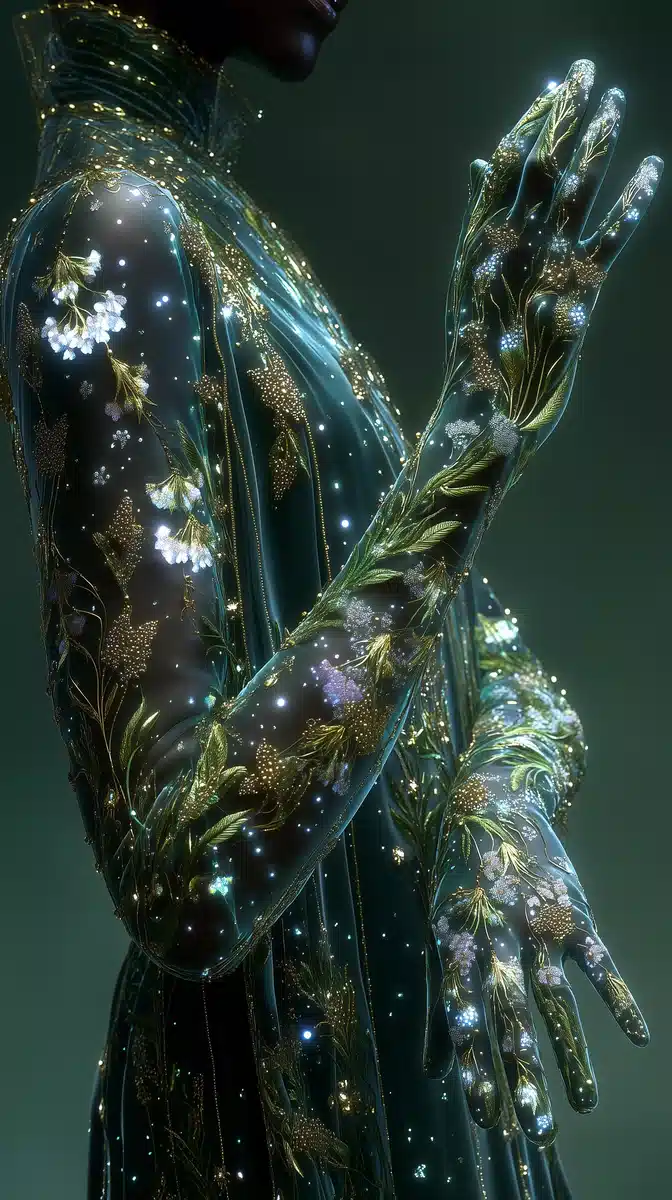
Предпросмотр Сгенерированного Изображения
curl --location 'https://api.legnext.ai/api/v1/diffusion' \
--header 'x-api-key: YOUR_API_KEY' \
--header 'Content-Type: application/json' \
--data '{
    "text": "Elegant, enchanted opera gloves floating gracefully against a plain dark green background. The gloves are long and velvet-textured, richly embroidered with fine golden thread in delicate celestial and botanical patterns. Subtle magical animation: golden embroidery glows faintly, tiny stars twinkle, and embroidered vines gently sway as if alive. The gloves exude fantasy couture elegance, with soft sparkles drifting from the fabric. No extra props or distractions the focus is entirely on the detailed, enchanted gloves with a clean, cinematic aesthetic. 8k --chaos 35 --ar 9:16 --v 7 --stylize 350 --profile de2zyv8"
}'
Примечание: Замените YOUR_API_KEY на ваш реальный API-ключ. Получите ваш API-ключ из вашей панели управления.
Как Использовать Этот Промпт
Обзор
Этот промпт разработан для генерации потрясающих изображений ИИ с использованием midjourney. Независимо от того, являетесь ли вы дизайнером, художником или разработчиком, этот промпт предоставляет прочную основу для создания профессиональных изображений с тщательно проработанными параметрами для последовательных результатов.
Пошаговое Руководство
- 1Copy the Prompt:Click the "Copy" button above to copy the complete prompt text to your clipboard.
- 2Open midjourney:Navigate to your midjourney interface (Discord bot or web interface).
- 3Paste and Generate:Paste the prompt into the message box and press Enter to start generating your image.
- 4Wait for Results:midjourney will process your prompt and generate multiple image variations, typically taking 1-2 minutes.
- 5Refine if Needed:Use the upscale or variation buttons to refine your favorite results.
Understanding the Parameters
Советы По Настройке
Лучшие Практики
Using with Our API
For developers and businesses looking to integrate midjourney into their applications, our API provides a simple way to generate images programmatically. You can automate image generation, process multiple prompts in batch, and integrate AI image generation directly into your workflow. Check the API Code Example section above for implementation details.
The API handles all the complexity of managing midjourney connections, queuing, and result retrieval, allowing you to focus on building your application. With support for all midjourneyfeatures and parameters, you get the full power of midjourney through a simple REST API interface.
Устранение Неполадок
Часто Задаваемые Вопросы
Хотите использовать этот промпт в своем приложении?
Генерируйте изображения с Midjourney API - Аккаунт Discord не требуется