Legnext - Midjourney API Platform

Defiant Figure In Baroque Mask Midjourney Prompt

Поделиться:

Полный Промпт

Editorial photography. A Dutch-angle close-up of close-up shot of a defiant figure wearing a baroque pop art mask made of shattered glass, surrounded by swirling translucent-like patterns illuminated by iridescent colorful lights, rebellion and chaos, vibrant strobe lighting, red, black, and silver tones. Inspired by Kehinde Wiley and Velázquez, rich textures, high definition, 8k photography. --chaos 35 --stylize 600 --profile uedg9e6 --profile gtkfkxb
stylize 600chaos 35

Parameter Guide

This prompt uses 2 parameters to control the generation.

Stylization

600

Maximum stylization - heavy artistic expression, abstract and highly stylized

Chaos

35

Moderate chaos - good variation while maintaining core concept

To modify these parameters, copy the prompt above and adjust the values. For example, change --ar 16:9 to --ar 1:1 for a square image.

Пример Кода API
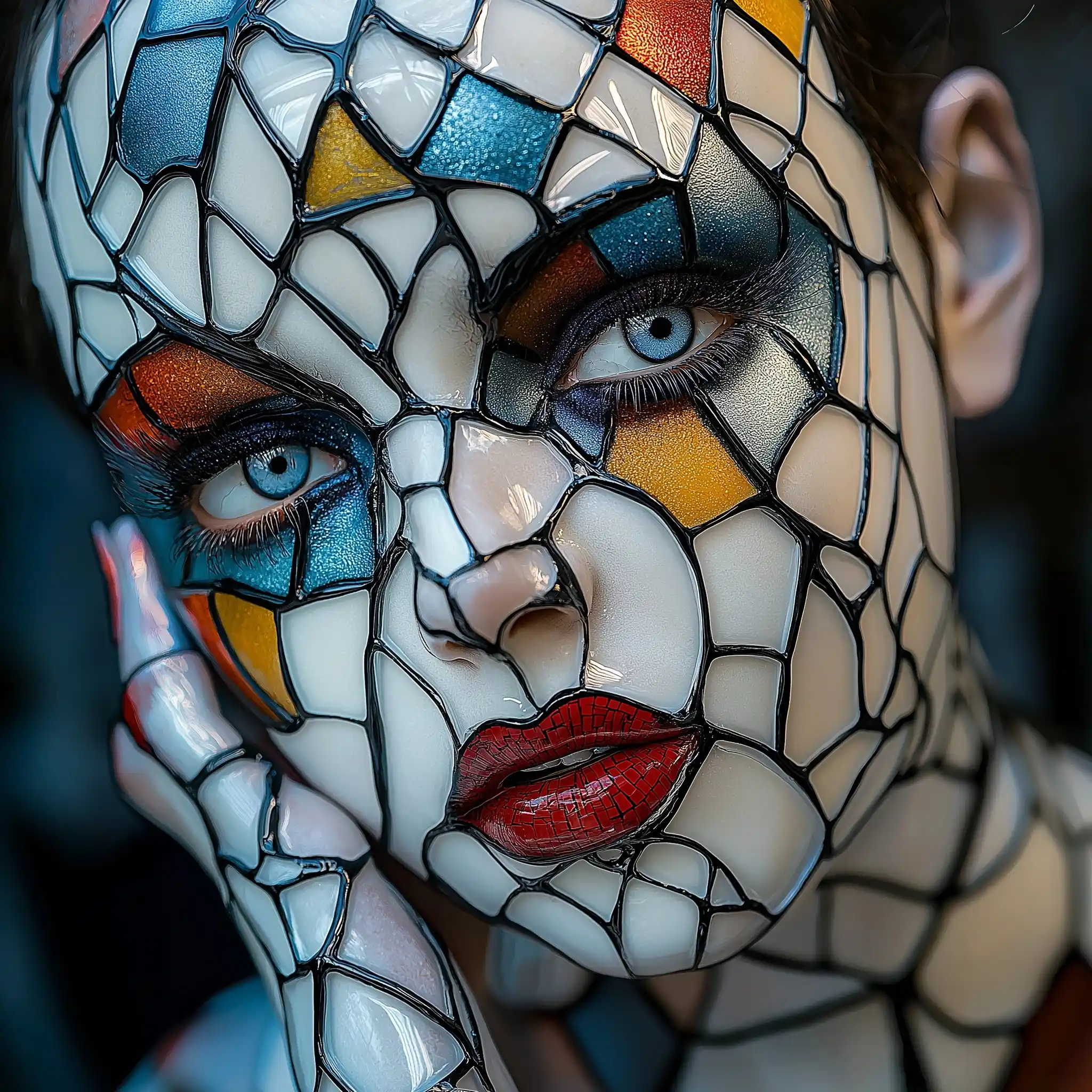
Generated image preview

Предпросмотр Сгенерированного Изображения

curl --location 'https://api.legnext.ai/api/v1/diffusion' \
--header 'x-api-key: YOUR_API_KEY' \
--header 'Content-Type: application/json' \
--data '{
    "text": "Editorial photography. A Dutch-angle close-up of close-up shot of a defiant figure wearing a baroque pop art mask made of shattered glass, surrounded by swirling translucent-like patterns illuminated by iridescent colorful lights, rebellion and chaos, vibrant strobe lighting, red, black, and silver tones. Inspired by Kehinde Wiley and Velázquez, rich textures, high definition, 8k photography. --chaos 35 --stylize 600 --profile uedg9e6 --profile gtkfkxb"
}'

Примечание: Замените YOUR_API_KEY на ваш реальный API-ключ. Получите ваш API-ключ из вашей панели управления.

Как Использовать Этот Промпт

Обзор

Этот промпт разработан для генерации потрясающих изображений ИИ с использованием midjourney. Независимо от того, являетесь ли вы дизайнером, художником или разработчиком, этот промпт предоставляет прочную основу для создания профессиональных изображений с тщательно проработанными параметрами для последовательных результатов.

Пошаговое Руководство

  1. 1
    Copy the Prompt:Click the "Copy" button above to copy the complete prompt text to your clipboard.
  2. 2
    Open midjourney:Navigate to your midjourney interface (Discord bot or web interface).
  3. 3
    Paste and Generate:Paste the prompt into the message box and press Enter to start generating your image.
  4. 4
    Wait for Results:midjourney will process your prompt and generate multiple image variations, typically taking 1-2 minutes.
  5. 5
    Refine if Needed:Use the upscale or variation buttons to refine your favorite results.

Understanding the Parameters

Chaos (--chaos):Determines variation. Higher values (0-100) produce more diverse results, while lower values create more predictable outputs.
Stylize (--stylize):Controls how much midjourney's default artistic style is applied. Values range from 0-1000, with higher values creating more artistic interpretations.

Советы По Настройке

Change the Subject:Replace the main subject with your own concept while keeping the style descriptors.
Adjust Colors:Add or modify color descriptions to match your brand or creative vision.
Modify Style:Experiment with different artistic styles like "watercolor", "oil painting", or "digital art".
Fine-tune Parameters:Adjust the numerical parameters to find the perfect balance for your use case.
Add Context:Include additional details about lighting, mood, or setting to refine the output.

Лучшие Практики

Start with the Base Prompt:Always test the original prompt first before making modifications.
Make Incremental Changes:When customizing, change one element at a time to understand its impact.
Keep a Prompt Library:Save successful variations for future use and reference.
Experiment with Seeds:Use the --seed parameter to maintain consistency across multiple generations.
Use Remix Mode:Enable remix mode in midjourney to easily iterate on successful outputs.

Using with Our API

For developers and businesses looking to integrate midjourney into their applications, our API provides a simple way to generate images programmatically. You can automate image generation, process multiple prompts in batch, and integrate AI image generation directly into your workflow. Check the API Code Example section above for implementation details.

The API handles all the complexity of managing midjourney connections, queuing, and result retrieval, allowing you to focus on building your application. With support for all midjourneyfeatures and parameters, you get the full power of midjourney through a simple REST API interface.

Устранение Неполадок

Results don't match expectations:Try adjusting the chaos and stylize parameters, or add more specific descriptive words to your prompt.
Image quality is low:Ensure you're using the latest model version (--v 6 or higher) and consider using upscale features for final outputs.
Prompt is rejected:Check that your prompt doesn't contain prohibited content. midjourney has content guidelines that all prompts must follow.
Generation is slow:During peak hours, midjourney may experience higher load. Consider using fast or turbo mode, or try during off-peak times.

Часто Задаваемые Вопросы

Чтобы использовать этот промпт, просто скопируйте полный текст промпта и вставьте его в midjourney. Вы также можете использовать наш API для программной генерации изображений. Промпт включает все необходимые параметры для оптимальных результатов.
Абсолютно! Не стесняйтесь настраивать любую часть промпта в соответствии с вашим творческим видением. Вы можете изменить предмет, стиль, цвета или любые другие элементы. Параметры (такие как --ar, --chaos, --stylize) также можно настроить для точной настройки ваших результатов.
Общие параметры включают: --ar (соотношение сторон, например 16:9), --chaos (уровень вариации 0-100), --stylize (художественная интерпретация 0-1000), --v (номер версии), --style (стиль рендеринга). Они помогают контролировать окончательный вывод вашего сгенерированного изображения.
Вы можете использовать наш API для автоматической генерации изображений с этим промптом. Просто отправьте POST-запрос на наш API-эндпоинт с текстом промпта. Проверьте раздел "Пример Кода API" выше для деталей реализации на нескольких языках программирования.
Сам промпт можно использовать бесплатно. Однако генерация изображений требует подписки Midjourney или использования нашего API-сервиса. Наш API предоставляет удобный способ интеграции Midjourney в ваши приложения без управления ботами Discord.
Права на использование изображений зависят от вашего плана подписки Midjourney. Как правило, платные подписчики могут использовать изображения в коммерческих целях, в то время как пользователи бесплатного уровня имеют ограниченные коммерческие права. Пожалуйста, ознакомьтесь с условиями обслуживания Midjourney для конкретных деталей.

Хотите использовать этот промпт в своем приложении?

Генерируйте изображения с Midjourney API - Аккаунт Discord не требуется