Legnext - Midjourney API Platform

Anthropomorphic Chili Pepper Portrait Midjourney Prompt

Compartilhar:

Prompt Completo

Ultra-realistic photo of an anthropomorphic chili pepper with a glossy red surface, smiling with human teeth and wearing black sunglasses. Surrounded by realistic flames, the pepper is sharply in focus, while the fiery background is slightly blurred. Dramatic lighting, detailed textures, expressive and joyful face, professional studio photography style. --v 7 --stylize 250
version 7stylize 250

Parameter Guide

This prompt uses 2 parameters to control the generation.

Model Version

v7

V7 is the latest and most capable Midjourney model with superior prompt understanding and coherence.

Stylization

250

Moderate stylization - balanced artistic interpretation (recommended for most use cases)

To modify these parameters, copy the prompt above and adjust the values. For example, change --ar 16:9 to --ar 1:1 for a square image.

Exemplo de Código API
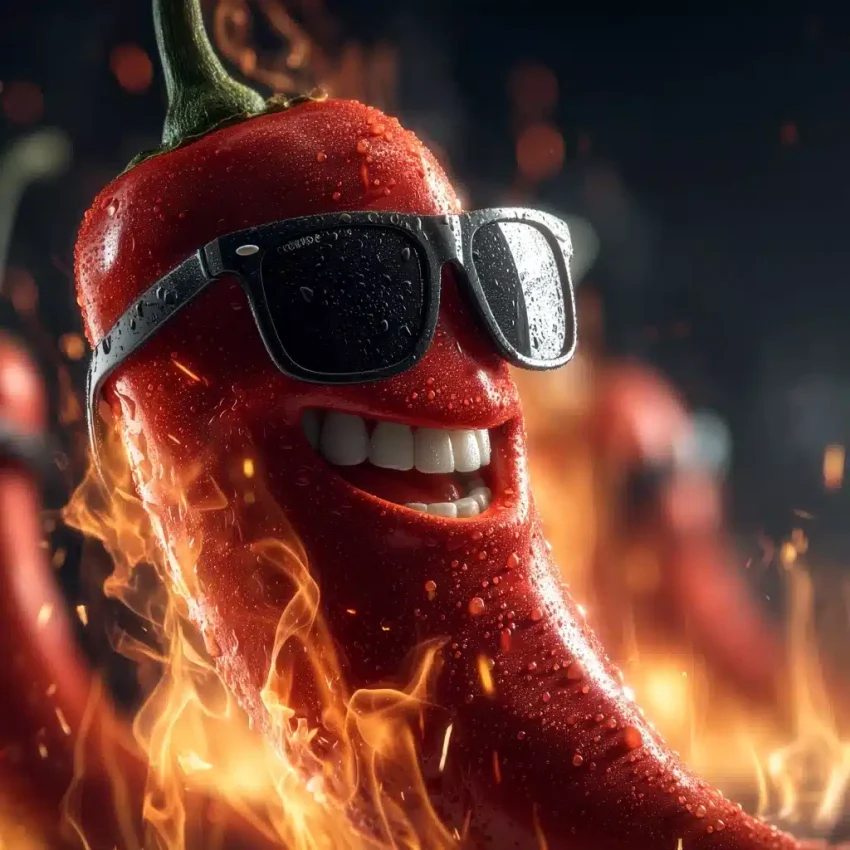
Generated image preview

Pré-visualização da Imagem Gerada

curl --location 'https://api.legnext.ai/api/v1/diffusion' \
--header 'x-api-key: YOUR_API_KEY' \
--header 'Content-Type: application/json' \
--data '{
    "text": "Ultra-realistic photo of an anthropomorphic chili pepper with a glossy red surface, smiling with human teeth and wearing black sunglasses. Surrounded by realistic flames, the pepper is sharply in focus, while the fiery background is slightly blurred. Dramatic lighting, detailed textures, expressive and joyful face, professional studio photography style. --v 7 --stylize 250"
}'

Nota: Substitua YOUR_API_KEY pela sua chave API real. Obtenha sua chave API em seu painel.

Como Usar Este Prompt

Visão Geral

Este prompt foi projetado para gerar imagens de IA impressionantes usando midjourney. Seja você um designer, artista ou desenvolvedor, este prompt fornece uma base sólida para criar imagens de qualidade profissional com parâmetros cuidadosamente elaborados para resultados consistentes.

Guia Passo a Passo

  1. 1
    Copy the Prompt:Click the "Copy" button above to copy the complete prompt text to your clipboard.
  2. 2
    Open midjourney:Navigate to your midjourney interface (Discord bot or web interface).
  3. 3
    Paste and Generate:Paste the prompt into the message box and press Enter to start generating your image.
  4. 4
    Wait for Results:midjourney will process your prompt and generate multiple image variations, typically taking 1-2 minutes.
  5. 5
    Refine if Needed:Use the upscale or variation buttons to refine your favorite results.

Understanding the Parameters

Stylize (--stylize):Controls how much midjourney's default artistic style is applied. Values range from 0-1000, with higher values creating more artistic interpretations.
Version (--v):Specifies which midjourney model version to use. Newer versions generally offer improved quality and understanding.

Dicas de Personalização

Change the Subject:Replace the main subject with your own concept while keeping the style descriptors.
Adjust Colors:Add or modify color descriptions to match your brand or creative vision.
Modify Style:Experiment with different artistic styles like "watercolor", "oil painting", or "digital art".
Fine-tune Parameters:Adjust the numerical parameters to find the perfect balance for your use case.
Add Context:Include additional details about lighting, mood, or setting to refine the output.

Melhores Práticas

Start with the Base Prompt:Always test the original prompt first before making modifications.
Make Incremental Changes:When customizing, change one element at a time to understand its impact.
Keep a Prompt Library:Save successful variations for future use and reference.
Experiment with Seeds:Use the --seed parameter to maintain consistency across multiple generations.
Use Remix Mode:Enable remix mode in midjourney to easily iterate on successful outputs.

Using with Our API

For developers and businesses looking to integrate midjourney into their applications, our API provides a simple way to generate images programmatically. You can automate image generation, process multiple prompts in batch, and integrate AI image generation directly into your workflow. Check the API Code Example section above for implementation details.

The API handles all the complexity of managing midjourney connections, queuing, and result retrieval, allowing you to focus on building your application. With support for all midjourneyfeatures and parameters, you get the full power of midjourney through a simple REST API interface.

Solução de Problemas

Results don't match expectations:Try adjusting the chaos and stylize parameters, or add more specific descriptive words to your prompt.
Image quality is low:Ensure you're using the latest model version (--v 6 or higher) and consider using upscale features for final outputs.
Prompt is rejected:Check that your prompt doesn't contain prohibited content. midjourney has content guidelines that all prompts must follow.
Generation is slow:During peak hours, midjourney may experience higher load. Consider using fast or turbo mode, or try during off-peak times.

Perguntas Frequentes

Para usar este prompt, simplesmente copie o texto completo do prompt e cole-o em midjourney. Você também pode usar nossa API para gerar imagens programaticamente. O prompt inclui todos os parâmetros necessários para resultados ótimos.
Absolutamente! Sinta-se à vontade para personalizar qualquer parte do prompt para corresponder à sua visão criativa. Você pode alterar o assunto, estilo, cores ou quaisquer outros elementos. Os parâmetros (como --ar, --chaos, --stylize) também podem ser ajustados para refinar seus resultados.
Os parâmetros comuns incluem: --ar (proporção de aspecto como 16:9), --chaos (nível de variação 0-100), --stylize (interpretação artística 0-1000), --v (número da versão), --style (estilo de renderização). Estes ajudam a controlar a saída final da sua imagem gerada.
Você pode usar nossa API para gerar imagens automaticamente com este prompt. Simplesmente envie uma solicitação POST para nosso endpoint de API com o texto do prompt. Verifique a seção "Exemplo de Código API" acima para detalhes de implementação em várias linguagens de programação.
O prompt em si é gratuito para usar. No entanto, gerar imagens requer uma assinatura Midjourney ou usar nosso serviço de API. Nossa API fornece uma maneira conveniente de integrar Midjourney em suas aplicações sem gerenciar bots do Discord.
Os direitos de uso de imagens dependem do seu plano de assinatura Midjourney. Geralmente, assinantes pagos podem usar imagens comercialmente, enquanto usuários do nível gratuito têm direitos comerciais limitados. Por favor, revise os termos de serviço do Midjourney para detalhes específicos.

Quer usar este prompt no seu app?

Gere imagens com Midjourney API - Nenhuma conta Discord necessária