Legnext - Midjourney API Platform

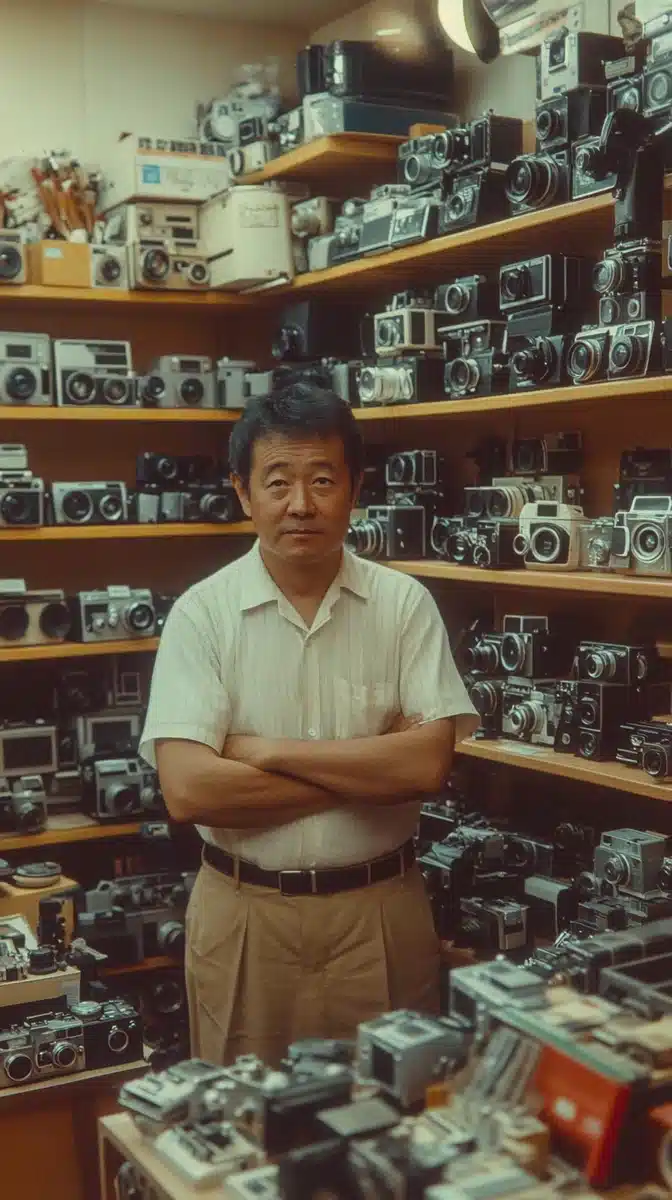
Vintage Camera Store Scene Midjourney Prompt

Share:

Full Prompt

British Hong Kong, China - 1983: A vintage 1980's Fujifilm negative film scan of a camera store salesman in front of shelves of cameras and lenses for sale. Kodak shot

API Code Example

Generated image preview

Generated Image Preview

curl --location 'https://api.legnext.ai/api/v1/diffusion' \
--header 'x-api-key: YOUR_API_KEY' \
--header 'Content-Type: application/json' \
--data '{
    "text": "British Hong Kong, China - 1983: A vintage 1980's Fujifilm negative film scan of a camera store salesman in front of shelves of cameras and lenses for sale. Kodak shot"
}'

Note: Replace YOUR_API_KEY with your actual API key. Get your API key from your dashboard.

How to Use This Prompt

Overview

This prompt is designed to generate stunning AI images using midjourney. Whether you're a designer, artist, or developer, this prompt provides a solid foundation for creating professional-quality images with carefully crafted parameters for consistent results.

Step-by-Step Guide

  1. 1
    Copy the Prompt:Click the "Copy" button above to copy the complete prompt text to your clipboard.
  2. 2
    Open midjourney:Navigate to your midjourney interface (Discord bot or web interface).
  3. 3
    Paste and Generate:Paste the prompt into the message box and press Enter to start generating your image.
  4. 4
    Wait for Results:midjourney will process your prompt and generate multiple image variations, typically taking 1-2 minutes.
  5. 5
    Refine if Needed:Use the upscale or variation buttons to refine your favorite results.

Customization Tips

Change the Subject:Replace the main subject with your own concept while keeping the style descriptors.
Adjust Colors:Add or modify color descriptions to match your brand or creative vision.
Modify Style:Experiment with different artistic styles like "watercolor", "oil painting", or "digital art".
Fine-tune Parameters:Adjust the numerical parameters to find the perfect balance for your use case.
Add Context:Include additional details about lighting, mood, or setting to refine the output.

Best Practices

Start with the Base Prompt:Always test the original prompt first before making modifications.
Make Incremental Changes:When customizing, change one element at a time to understand its impact.
Keep a Prompt Library:Save successful variations for future use and reference.
Experiment with Seeds:Use the --seed parameter to maintain consistency across multiple generations.
Use Remix Mode:Enable remix mode in midjourney to easily iterate on successful outputs.

Using with Our API

For developers and businesses looking to integrate midjourney into their applications, our API provides a simple way to generate images programmatically. You can automate image generation, process multiple prompts in batch, and integrate AI image generation directly into your workflow. Check the API Code Example section above for implementation details.

The API handles all the complexity of managing midjourney connections, queuing, and result retrieval, allowing you to focus on building your application. With support for all midjourneyfeatures and parameters, you get the full power of midjourney through a simple REST API interface.

Troubleshooting

Results don't match expectations:Try adjusting the chaos and stylize parameters, or add more specific descriptive words to your prompt.
Image quality is low:Ensure you're using the latest model version (--v 6 or higher) and consider using upscale features for final outputs.
Prompt is rejected:Check that your prompt doesn't contain prohibited content. midjourney has content guidelines that all prompts must follow.
Generation is slow:During peak hours, midjourney may experience higher load. Consider using fast or turbo mode, or try during off-peak times.

Frequently Asked Questions

To use this prompt, simply copy the full prompt text and paste it into midjourney. You can also use our API to generate images programmatically. The prompt includes all necessary parameters for optimal results.
Absolutely! Feel free to customize any part of the prompt to match your creative vision. You can change the subject, style, colors, or any other elements. The parameters (like --ar, --chaos, --stylize) can also be adjusted to fine-tune your results.
Common parameters include: --ar (aspect ratio like 16:9), --chaos (variation level 0-100), --stylize (artistic interpretation 0-1000), --v (version number), --style (rendering style). These help control the final output of your generated image.
You can use our API to generate images with this prompt automatically. Simply send a POST request to our API endpoint with the prompt text. Check the "API Code Example" section above for implementation details in multiple programming languages.
The prompt itself is free to use. However, generating images requires either a Midjourney subscription or using our API service. Our API provides a convenient way to integrate Midjourney into your applications without managing Discord bots.
Image usage rights depend on your Midjourney subscription plan. Generally, paid subscribers can use images commercially, while free tier users have limited commercial rights. Please review Midjourney's terms of service for specific details.

Want to use this prompt in your app?

Generate images with Midjourney API - No Discord account required