
Surreal Koi In Water Midjourney Prompt
Volledige Prompt
porcelain koi with blue and white floral patterns swimming in clear blue water, one has gold metal details and delicate details, in a surreal style, clean water. This is an art photography macro shot, captured using a Canon camera for high definition. --chaos 40 --ar 9:16 --v 7 --stylize 300 --profile u4qczsqParameter Guide
This prompt uses 4 parameters to control the generation.
Aspect Ratio
9:16Vertical format - optimized for mobile screens, Instagram Stories, and TikTok
Mobile-first content
Model Version
v7V7 is the latest and most capable Midjourney model with superior prompt understanding and coherence.
Stylization
300High stylization - strong artistic interpretation for creative work
Chaos
40Moderate chaos - good variation while maintaining core concept
To modify these parameters, copy the prompt above and adjust the values. For example, change --ar 16:9 to --ar 1:1 for a square image.
API Code Voorbeeld
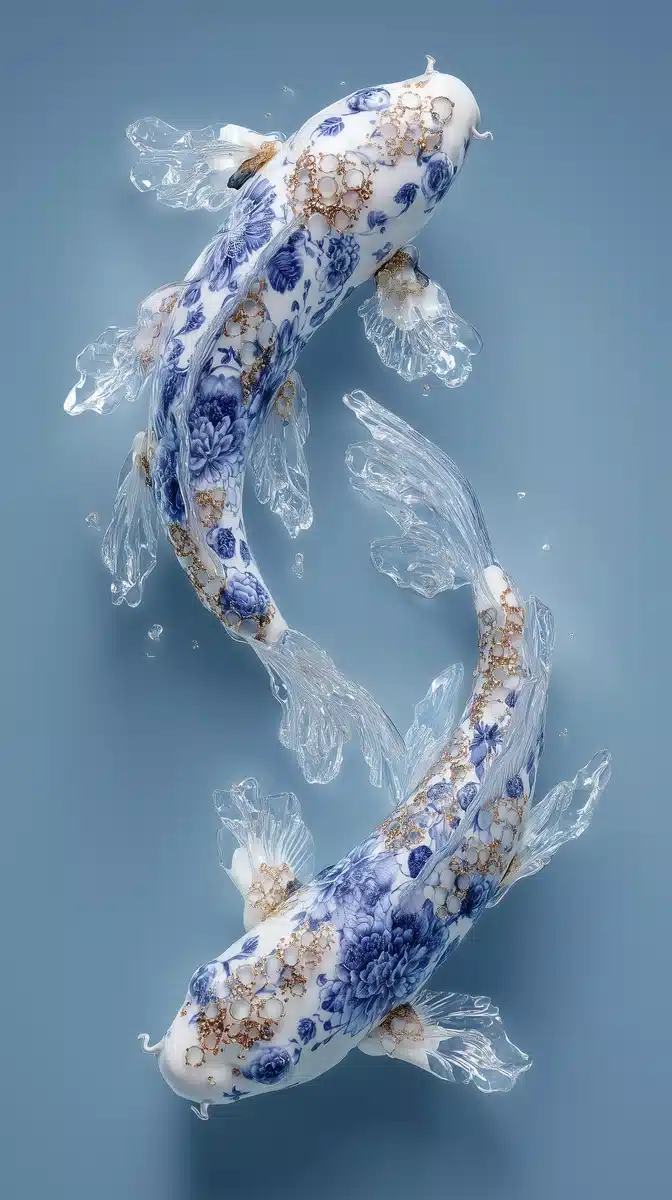
Voorvertoning Gegenereerde Afbeelding
curl --location 'https://api.legnext.ai/api/v1/diffusion' \
--header 'x-api-key: YOUR_API_KEY' \
--header 'Content-Type: application/json' \
--data '{
    "text": "porcelain koi with blue and white floral patterns swimming in clear blue water, one has gold metal details and delicate details, in a surreal style, clean water. This is an art photography macro shot, captured using a Canon camera for high definition. --chaos 40 --ar 9:16 --v 7 --stylize 300 --profile u4qczsq"
}'
Opmerking: Vervang YOUR_API_KEY door uw werkelijke API-sleutel. Haal uw API-sleutel op van uw dashboard.
Hoe Deze Prompt Te Gebruiken
Overzicht
Deze prompt is ontworpen om prachtige AI-afbeeldingen te genereren met midjourney. Of u nu een ontwerper, kunstenaar of ontwikkelaar bent, deze prompt biedt een solide basis voor het maken van professionele kwaliteitsafbeeldingen met zorgvuldig uitgewerkte parameters voor consistente resultaten.
Stap-voor-Stap Gids
- 1Copy the Prompt:Click the "Copy" button above to copy the complete prompt text to your clipboard.
- 2Open midjourney:Navigate to your midjourney interface (Discord bot or web interface).
- 3Paste and Generate:Paste the prompt into the message box and press Enter to start generating your image.
- 4Wait for Results:midjourney will process your prompt and generate multiple image variations, typically taking 1-2 minutes.
- 5Refine if Needed:Use the upscale or variation buttons to refine your favorite results.
Understanding the Parameters
Aanpassingstips
Beste Praktijken
Using with Our API
For developers and businesses looking to integrate midjourney into their applications, our API provides a simple way to generate images programmatically. You can automate image generation, process multiple prompts in batch, and integrate AI image generation directly into your workflow. Check the API Code Example section above for implementation details.
The API handles all the complexity of managing midjourney connections, queuing, and result retrieval, allowing you to focus on building your application. With support for all midjourneyfeatures and parameters, you get the full power of midjourney through a simple REST API interface.
Probleemoplossing
Veelgestelde Vragen
Wilt u deze prompt in uw app gebruiken?
Genereer afbeeldingen met Midjourney API - Geen Discord-account vereist