Legnext - Midjourney API Platform

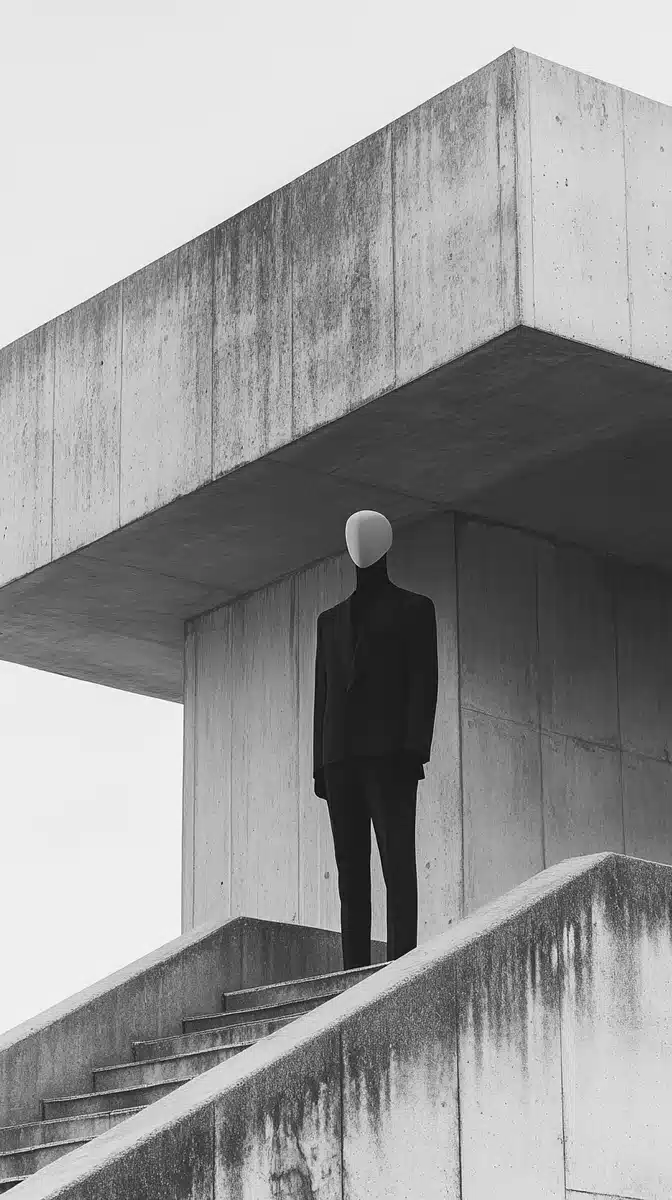
Anthropomorphic Figure In Brutalism Midjourney Prompt

공유:

전체 프롬프트

Editorial fashion photograph, an anthropomorphic character in a black suit with a half-length body standing on the stairs of a brutalist architecture. Hasselblad X2D 50C. Black and white film photography, soft lighting, minimalistic photography, ethereal aesthetic.

API 코드 예제

Generated image preview

생성된 이미지 미리보기

curl --location 'https://api.legnext.ai/api/v1/diffusion' \
--header 'x-api-key: YOUR_API_KEY' \
--header 'Content-Type: application/json' \
--data '{
    "text": "Editorial fashion photograph, an anthropomorphic character in a black suit with a half-length body standing on the stairs of a brutalist architecture. Hasselblad X2D 50C. Black and white film photography, soft lighting, minimalistic photography, ethereal aesthetic."
}'

참고: YOUR_API_KEY를 실제 API 키로 교체하세요. API 키는 대시보드에서 가져올 수 있습니다.

이 프롬프트 사용 방법

개요

이 프롬프트는 midjourney를 사용하여 놀라운 AI 이미지를 생성하도록 설계되었습니다. 디자이너, 아티스트 또는 개발자이든, 이 프롬프트는 일관된 결과를 위해 신중하게 제작된 매개변수로 전문적인 품질의 이미지를 생성하기 위한 견고한 기반을 제공합니다.

단계별 가이드

  1. 1
    Copy the Prompt:Click the "Copy" button above to copy the complete prompt text to your clipboard.
  2. 2
    Open midjourney:Navigate to your midjourney interface (Discord bot or web interface).
  3. 3
    Paste and Generate:Paste the prompt into the message box and press Enter to start generating your image.
  4. 4
    Wait for Results:midjourney will process your prompt and generate multiple image variations, typically taking 1-2 minutes.
  5. 5
    Refine if Needed:Use the upscale or variation buttons to refine your favorite results.

사용자 정의 팁

Change the Subject:Replace the main subject with your own concept while keeping the style descriptors.
Adjust Colors:Add or modify color descriptions to match your brand or creative vision.
Modify Style:Experiment with different artistic styles like "watercolor", "oil painting", or "digital art".
Fine-tune Parameters:Adjust the numerical parameters to find the perfect balance for your use case.
Add Context:Include additional details about lighting, mood, or setting to refine the output.

모범 사례

Start with the Base Prompt:Always test the original prompt first before making modifications.
Make Incremental Changes:When customizing, change one element at a time to understand its impact.
Keep a Prompt Library:Save successful variations for future use and reference.
Experiment with Seeds:Use the --seed parameter to maintain consistency across multiple generations.
Use Remix Mode:Enable remix mode in midjourney to easily iterate on successful outputs.

Using with Our API

For developers and businesses looking to integrate midjourney into their applications, our API provides a simple way to generate images programmatically. You can automate image generation, process multiple prompts in batch, and integrate AI image generation directly into your workflow. Check the API Code Example section above for implementation details.

The API handles all the complexity of managing midjourney connections, queuing, and result retrieval, allowing you to focus on building your application. With support for all midjourneyfeatures and parameters, you get the full power of midjourney through a simple REST API interface.

문제 해결

Results don't match expectations:Try adjusting the chaos and stylize parameters, or add more specific descriptive words to your prompt.
Image quality is low:Ensure you're using the latest model version (--v 6 or higher) and consider using upscale features for final outputs.
Prompt is rejected:Check that your prompt doesn't contain prohibited content. midjourney has content guidelines that all prompts must follow.
Generation is slow:During peak hours, midjourney may experience higher load. Consider using fast or turbo mode, or try during off-peak times.

자주 묻는 질문

이 프롬프트를 사용하려면 전체 프롬프트 텍스트를 복사하여 midjourney에 붙여넣기만 하면 됩니다. API를 사용하여 프로그래밍 방식으로 이미지를 생성할 수도 있습니다. 프롬프트에는 최적의 결과를 위한 모든 필요한 매개변수가 포함되어 있습니다.
물론입니다! 창의적인 비전에 맞게 프롬프트의 어떤 부분이든 자유롭게 사용자 정의할 수 있습니다. 주제, 스타일, 색상 또는 기타 요소를 변경할 수 있습니다. 매개변수(--ar, --chaos, --stylize 등)도 결과를 미세 조정하기 위해 조정할 수 있습니다.
일반적인 매개변수에는 --ar(16:9와 같은 종횡비), --chaos(변형 수준 0-100), --stylize(예술적 해석 0-1000), --v(버전 번호), --style(렌더링 스타일)이 포함됩니다. 이러한 매개변수는 생성된 이미지의 최종 출력을 제어하는 데 도움이 됩니다.
API를 사용하여 이 프롬프트로 자동으로 이미지를 생성할 수 있습니다. 프롬프트 텍스트와 함께 API 엔드포인트에 POST 요청을 보내기만 하면 됩니다. 여러 프로그래밍 언어의 구현 세부 사항은 위의 "API 코드 예제" 섹션을 확인하세요.
프롬프트 자체는 무료로 사용할 수 있습니다. 그러나 이미지 생성에는 Midjourney 구독 또는 우리의 API 서비스 사용이 필요합니다. 우리의 API는 Discord 봇을 관리하지 않고도 Midjourney를 애플리케이션에 통합하는 편리한 방법을 제공합니다.
이미지 사용 권한은 Midjourney 구독 플랜에 따라 다릅니다. 일반적으로 유료 구독자는 이미지를 상업적으로 사용할 수 있지만 무료 사용자는 제한된 상업적 권한을 가집니다. 구체적인 세부 사항은 Midjourney의 서비스 약관을 검토하세요.

앱에서 이 프롬프트를 사용하시겠습니까?

Midjourney API로 이미지 생성 - Discord 계정 불필요