
An ultra-realistic, high-resolution infographic showcasing a... - Midjourney V7 Prompt
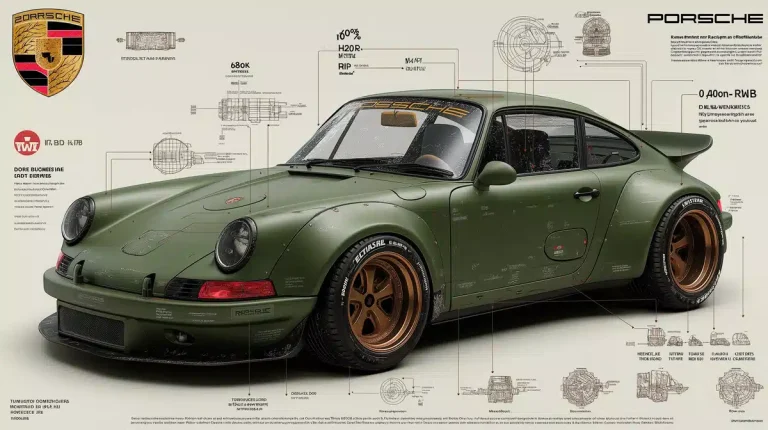
An ultra-realistic, high-resolution infographic showcasing a custom Porsche 911 RWB in matte military green. The car is rendered in cinematic studio l... | Tags: automotive design, cinematic lighting, luxury brand visualization
完全なプロンプト
An ultra-realistic, high-resolution infographic showcasing a custom Porsche 911 RWB in matte military green. The car is rendered in cinematic studio lighting, every detail visible: wide-body fenders, riveted panels, deep-dish bronze wheels, tactical decals, carbon fiber spoiler. Displayed on a clean white or concrete-textured surface with soft shadows and subtle reflections. Around the vehicle, elegant minimalist infographics display performance stats (HP, torque, 0-100 km/h), engineering highlights (carbon fiber elements, reinforced suspension, exhaust system), and RWB body kit specs. The official Porsche crest logo appears in the top-left, sharp and glossy. Font is modern, high-end--typographic hierarchy mimics automotive catalog design. Includes small engineering diagrams, exploded part views, and zoom-in callouts of materials. Color scheme: military green, black, bronze, off-white. Professional studio product visualization style, rendered like a luxury brand campaign. --ar 16:9 --style raw --v 7 --profile 466vsudParameter Guide
This prompt uses 3 parameters to control the generation.
Aspect Ratio
16:9Widescreen format - perfect for presentations, YouTube thumbnails, and landscape photography
Cinematic feel
Model Version
v7V7 is the latest and most capable Midjourney model with superior prompt understanding and coherence.
Style Raw
enabledReduces artistic interpretation for more photorealistic, literal results
Best for product photography and precise control
To modify these parameters, copy the prompt above and adjust the values. For example, change --ar 16:9 to --ar 1:1 for a square image.
APIコード例
生成された画像のプレビュー
curl --location 'https://api.legnext.ai/api/v1/diffusion' \
--header 'x-api-key: YOUR_API_KEY' \
--header 'Content-Type: application/json' \
--data '{
    "text": "An ultra-realistic, high-resolution infographic showcasing a custom Porsche 911 RWB in matte military green. The car is rendered in cinematic studio lighting, every detail visible: wide-body fenders, riveted panels, deep-dish bronze wheels, tactical decals, carbon fiber spoiler. Displayed on a clean white or concrete-textured surface with soft shadows and subtle reflections. Around the vehicle, elegant minimalist infographics display performance stats (HP, torque, 0-100 km/h), engineering highlights (carbon fiber elements, reinforced suspension, exhaust system), and RWB body kit specs. The official Porsche crest logo appears in the top-left, sharp and glossy. Font is modern, high-end--typographic hierarchy mimics automotive catalog design. Includes small engineering diagrams, exploded part views, and zoom-in callouts of materials. Color scheme: military green, black, bronze, off-white. Professional studio product visualization style, rendered like a luxury brand campaign. --ar 16:9 --style raw --v 7 --profile 466vsud"
}'
注意: YOUR_API_KEY を実際のAPIキーに置き換えてください。APIキーは ダッシュボード から取得できます。
このプロンプトの使用方法
概要
このプロンプトは、midjourneyを使用して素晴らしいAI画像を生成するように設計されています。デザイナー、アーティスト、開発者のいずれであっても、このプロンプトは、一貫した結果を得るために慎重に作成されたパラメータを使用して、プロフェッショナル品質の画像を作成するための強固な基盤を提供します。
ステップバイステップガイド
- 1Copy the Prompt:Click the "Copy" button above to copy the complete prompt text to your clipboard.
- 2Open midjourney:Navigate to your midjourney interface (Discord bot or web interface).
- 3Paste and Generate:Paste the prompt into the message box and press Enter to start generating your image.
- 4Wait for Results:midjourney will process your prompt and generate multiple image variations, typically taking 1-2 minutes.
- 5Refine if Needed:Use the upscale or variation buttons to refine your favorite results.
Understanding the Parameters
カスタマイズのヒント
ベストプラクティス
Using with Our API
For developers and businesses looking to integrate midjourney into their applications, our API provides a simple way to generate images programmatically. You can automate image generation, process multiple prompts in batch, and integrate AI image generation directly into your workflow. Check the API Code Example section above for implementation details.
The API handles all the complexity of managing midjourney connections, queuing, and result retrieval, allowing you to focus on building your application. With support for all midjourneyfeatures and parameters, you get the full power of midjourney through a simple REST API interface.
関連トピック
このプロンプトは、以下のトピックに関連する画像を作成するのに特に効果的です:
Explore these related topics to find more prompts and inspiration for your creative projects.