
Luxury Rugged Tequila Website Design Midjourney Prompt
完全なプロンプト
Create a luxury-rugged website design for Bandero Tequila, blending deep, rich tones with warm, earthy textures. Use a refined color palette of dark espresso brown, cream white, agave green, and rich red clay, accented by warm gold highlights to evoke a sense of heritage, craftsmanship, and modern sophistication. The design should feel bold and immersive, featuring organic textures like weathered leather, aged wood, and hand-forged metal, combined with smooth, modern UI elements. Parallax scrolling and subtle animations (like a gold shimmer over the logo or a slow pour effect) should create an engaging experience. The layout should flow seamlessly, guiding users through: Hero section: A cinematic shot of Bandero bottles set against the Los Altos, Jalisco landscape at sunset, with golden light reflecting off the glass. About & Process: Storytelling elements with sunlit agave fields, warm red clay soil, and the glow of a traditional stone oven, emphasizing Bandero’s additive-free craftsmanship. Cocktail Recipes: Rich, moody backdrops with textured glassware and warm lighting, featuring vibrant citrus garnishes and deep, earthy tones. Portfolio: Interactive product showcase with Bandero Blanco & Bandero Café, displayed with subtle gold and agave-green highlights. Awards & Accolades: A refined, gold-embossed section featuring scrolling accolades and media features, complemented by warm candlelight-inspired glows. The typography should be bold, elegant, and slightly rustic, reflecting Bandero’s authentic yet premium identity. The overall aesthetic should balance darkness with warmth, evoking a luxurious yet raw and untamed tequila experience--like stepping into an elevated, candle-lit cantina in the heart of Jalisco.APIコード例
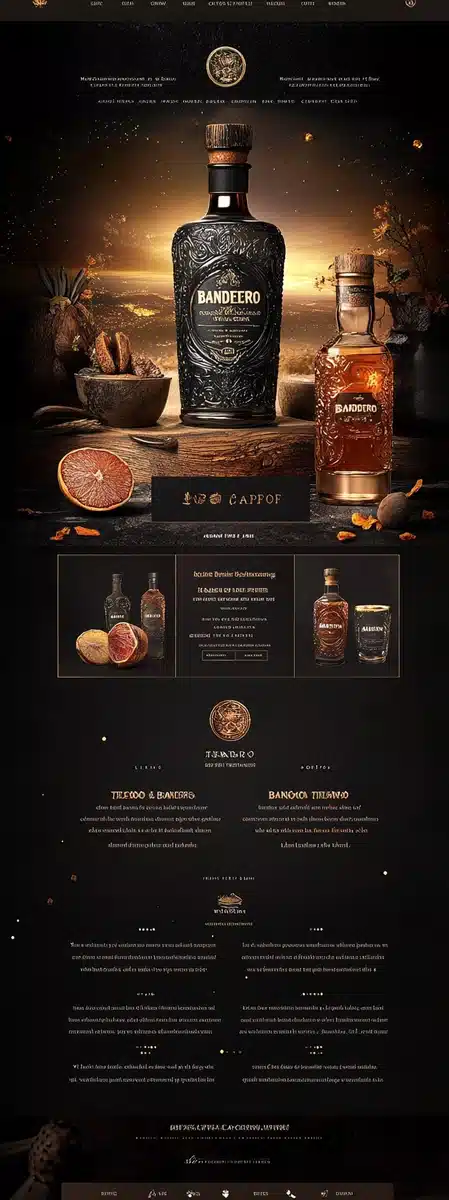
生成された画像のプレビュー
curl --location 'https://api.legnext.ai/api/v1/diffusion' \
--header 'x-api-key: YOUR_API_KEY' \
--header 'Content-Type: application/json' \
--data '{
    "text": "Create a luxury-rugged website design for Bandero Tequila, blending deep, rich tones with warm, earthy textures. Use a refined color palette of dark espresso brown, cream white, agave green, and rich red clay, accented by warm gold highlights to evoke a sense of heritage, craftsmanship, and modern sophistication. The design should feel bold and immersive, featuring organic textures like weathered leather, aged wood, and hand-forged metal, combined with smooth, modern UI elements. Parallax scrolling and subtle animations (like a gold shimmer over the logo or a slow pour effect) should create an engaging experience. The layout should flow seamlessly, guiding users through: Hero section: A cinematic shot of Bandero bottles set against the Los Altos, Jalisco landscape at sunset, with golden light reflecting off the glass. About & Process: Storytelling elements with sunlit agave fields, warm red clay soil, and the glow of a traditional stone oven, emphasizing Bandero’s additive-free craftsmanship. Cocktail Recipes: Rich, moody backdrops with textured glassware and warm lighting, featuring vibrant citrus garnishes and deep, earthy tones. Portfolio: Interactive product showcase with Bandero Blanco & Bandero Café, displayed with subtle gold and agave-green highlights. Awards & Accolades: A refined, gold-embossed section featuring scrolling accolades and media features, complemented by warm candlelight-inspired glows. The typography should be bold, elegant, and slightly rustic, reflecting Bandero’s authentic yet premium identity. The overall aesthetic should balance darkness with warmth, evoking a luxurious yet raw and untamed tequila experience--like stepping into an elevated, candle-lit cantina in the heart of Jalisco."
}'
注意: YOUR_API_KEY を実際のAPIキーに置き換えてください。APIキーは ダッシュボード から取得できます。
このプロンプトの使用方法
概要
このプロンプトは、midjourneyを使用して素晴らしいAI画像を生成するように設計されています。デザイナー、アーティスト、開発者のいずれであっても、このプロンプトは、一貫した結果を得るために慎重に作成されたパラメータを使用して、プロフェッショナル品質の画像を作成するための強固な基盤を提供します。
ステップバイステップガイド
- 1Copy the Prompt:Click the "Copy" button above to copy the complete prompt text to your clipboard.
- 2Open midjourney:Navigate to your midjourney interface (Discord bot or web interface).
- 3Paste and Generate:Paste the prompt into the message box and press Enter to start generating your image.
- 4Wait for Results:midjourney will process your prompt and generate multiple image variations, typically taking 1-2 minutes.
- 5Refine if Needed:Use the upscale or variation buttons to refine your favorite results.
カスタマイズのヒント
ベストプラクティス
Using with Our API
For developers and businesses looking to integrate midjourney into their applications, our API provides a simple way to generate images programmatically. You can automate image generation, process multiple prompts in batch, and integrate AI image generation directly into your workflow. Check the API Code Example section above for implementation details.
The API handles all the complexity of managing midjourney connections, queuing, and result retrieval, allowing you to focus on building your application. With support for all midjourneyfeatures and parameters, you get the full power of midjourney through a simple REST API interface.