Legnext - Midjourney API Platform

Neon Strawberry Mosaic Photography Midjourney Prompt

Condividi:

Prompt Completo

A hot pink and red disco mirror-like strawberry with the texture of a glossy mosaic, set against a pink background in a neon style. The image is vibrant, colorful, and shiny, created through studio photography with a surrealist aesthetic. The high-resolution image was rendered using Octane, resulting in bright, vivid colors. The art direction was provided by David LaChapelle and Tim Walker, and the image was featured on the cover of a fashion magazine, such as Vogue. --ar 2:3 --v 7
ar 2:3version 7

Parameter Guide

This prompt uses 2 parameters to control the generation.

Aspect Ratio

2:3

Portrait format - classic for portraits and magazine covers

Professional photography standard

Model Version

v7

V7 is the latest and most capable Midjourney model with superior prompt understanding and coherence.

To modify these parameters, copy the prompt above and adjust the values. For example, change --ar 16:9 to --ar 1:1 for a square image.

Esempio di Codice API
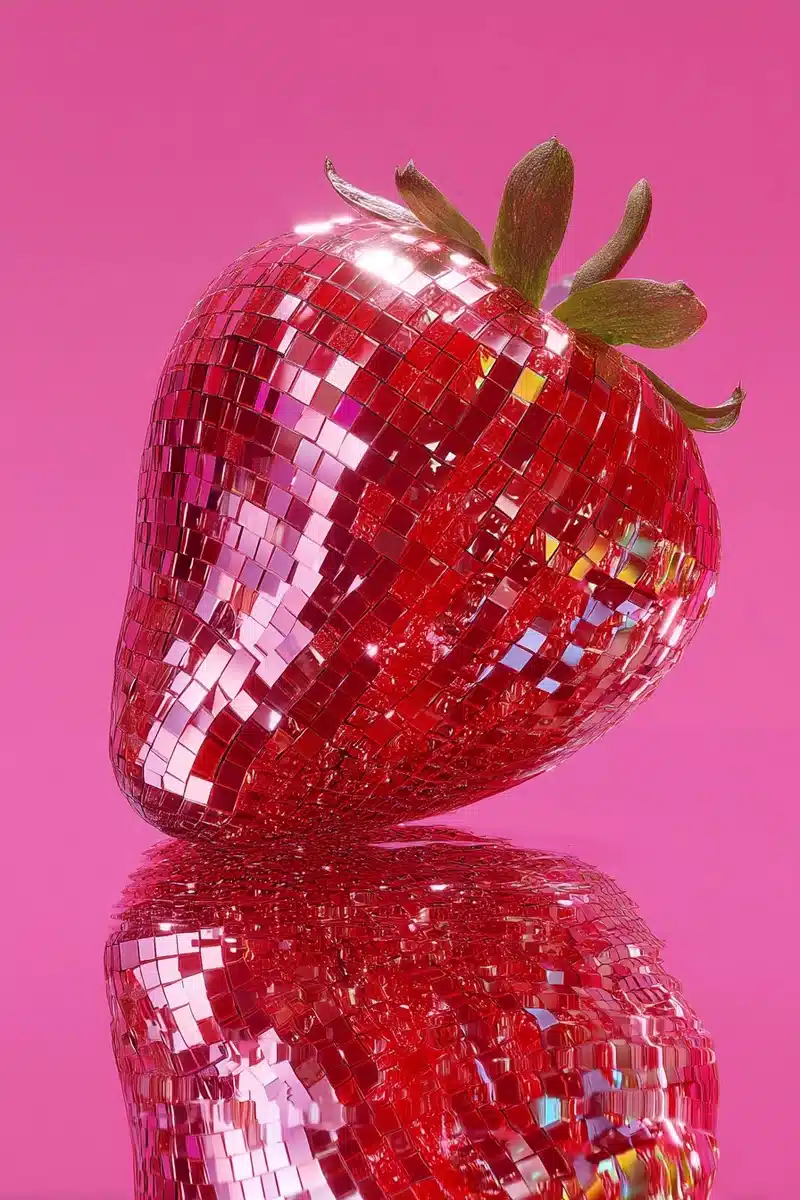
Generated image preview

Anteprima Immagine Generata

curl --location 'https://api.legnext.ai/api/v1/diffusion' \
--header 'x-api-key: YOUR_API_KEY' \
--header 'Content-Type: application/json' \
--data '{
    "text": "A hot pink and red disco mirror-like strawberry with the texture of a glossy mosaic, set against a pink background in a neon style. The image is vibrant, colorful, and shiny, created through studio photography with a surrealist aesthetic. The high-resolution image was rendered using Octane, resulting in bright, vivid colors. The art direction was provided by David LaChapelle and Tim Walker, and the image was featured on the cover of a fashion magazine, such as Vogue. --ar 2:3 --v 7"
}'

Nota: Sostituisci YOUR_API_KEY con la tua chiave API effettiva. Ottieni la tua chiave API da la tua dashboard.

Come Usare Questo Prompt

Panoramica

Questo prompt è progettato per generare immagini AI straordinarie usando midjourney. Che tu sia un designer, un artista o uno sviluppatore, questo prompt fornisce una solida base per creare immagini di qualità professionale con parametri accuratamente elaborati per risultati coerenti.

Guida Passo-Passo

  1. 1
    Copy the Prompt:Click the "Copy" button above to copy the complete prompt text to your clipboard.
  2. 2
    Open midjourney:Navigate to your midjourney interface (Discord bot or web interface).
  3. 3
    Paste and Generate:Paste the prompt into the message box and press Enter to start generating your image.
  4. 4
    Wait for Results:midjourney will process your prompt and generate multiple image variations, typically taking 1-2 minutes.
  5. 5
    Refine if Needed:Use the upscale or variation buttons to refine your favorite results.

Understanding the Parameters

Aspect Ratio (--ar):Controls the width-to-height ratio. Common ratios include 16:9 for widescreen, 1:1 for square, and 3:2 for standard photos.
Version (--v):Specifies which midjourney model version to use. Newer versions generally offer improved quality and understanding.

Suggerimenti per la Personalizzazione

Change the Subject:Replace the main subject with your own concept while keeping the style descriptors.
Adjust Colors:Add or modify color descriptions to match your brand or creative vision.
Modify Style:Experiment with different artistic styles like "watercolor", "oil painting", or "digital art".
Fine-tune Parameters:Adjust the numerical parameters to find the perfect balance for your use case.
Add Context:Include additional details about lighting, mood, or setting to refine the output.

Migliori Pratiche

Start with the Base Prompt:Always test the original prompt first before making modifications.
Make Incremental Changes:When customizing, change one element at a time to understand its impact.
Keep a Prompt Library:Save successful variations for future use and reference.
Experiment with Seeds:Use the --seed parameter to maintain consistency across multiple generations.
Use Remix Mode:Enable remix mode in midjourney to easily iterate on successful outputs.

Using with Our API

For developers and businesses looking to integrate midjourney into their applications, our API provides a simple way to generate images programmatically. You can automate image generation, process multiple prompts in batch, and integrate AI image generation directly into your workflow. Check the API Code Example section above for implementation details.

The API handles all the complexity of managing midjourney connections, queuing, and result retrieval, allowing you to focus on building your application. With support for all midjourneyfeatures and parameters, you get the full power of midjourney through a simple REST API interface.

Risoluzione dei Problemi

Results don't match expectations:Try adjusting the chaos and stylize parameters, or add more specific descriptive words to your prompt.
Image quality is low:Ensure you're using the latest model version (--v 6 or higher) and consider using upscale features for final outputs.
Prompt is rejected:Check that your prompt doesn't contain prohibited content. midjourney has content guidelines that all prompts must follow.
Generation is slow:During peak hours, midjourney may experience higher load. Consider using fast or turbo mode, or try during off-peak times.

Domande Frequenti

Per usare questo prompt, copia semplicemente il testo completo del prompt e incollalo in midjourney. Puoi anche usare la nostra API per generare immagini in modo programmatico. Il prompt include tutti i parametri necessari per risultati ottimali.
Assolutamente! Sentiti libero di personalizzare qualsiasi parte del prompt per corrispondere alla tua visione creativa. Puoi cambiare il soggetto, lo stile, i colori o qualsiasi altro elemento. I parametri (come --ar, --chaos, --stylize) possono anche essere regolati per ottimizzare i tuoi risultati.
I parametri comuni includono: --ar (rapporto d'aspetto come 16:9), --chaos (livello di variazione 0-100), --stylize (interpretazione artistica 0-1000), --v (numero di versione), --style (stile di rendering). Questi aiutano a controllare l'output finale della tua immagine generata.
Puoi usare la nostra API per generare immagini automaticamente con questo prompt. Invia semplicemente una richiesta POST al nostro endpoint API con il testo del prompt. Controlla la sezione "Esempio di Codice API" sopra per i dettagli di implementazione in più linguaggi di programmazione.
Il prompt stesso è gratuito da usare. Tuttavia, generare immagini richiede un abbonamento Midjourney o l'uso del nostro servizio API. La nostra API fornisce un modo conveniente per integrare Midjourney nelle tue applicazioni senza gestire bot Discord.
I diritti di utilizzo delle immagini dipendono dal tuo piano di abbonamento Midjourney. Generalmente, gli abbonati a pagamento possono usare le immagini commercialmente, mentre gli utenti del livello gratuito hanno diritti commerciali limitati. Si prega di rivedere i termini di servizio di Midjourney per dettagli specifici.

Vuoi usare questo prompt nella tua app?

Genera immagini con Midjourney API - Nessun account Discord richiesto