
Futuristic Dragon And Light Midjourney Prompt
Prompt Completo
renderings, mechanized forms, filthy sculptures, dark teal and yellow and dark black, epic art, shroom core, sharp attention to detail Concept art of an abstract, dark white, futuristic, mechanical dragon,angels and wings of light, wings fire, A radiant humanoid figure made of reflective black material, illuminated from within by golden, glowing light particles bursting from the chest. The figure appears ethereal and powerful, standing against a dark blue, cosmic background with dynamic light streaks and sparks radiating outward. The style is hyper-realistic with a futuristic and spiritual aesthetic, capturing a moment of transformation or awakening, vast universe, the huge moon is being melted by the sun. A sculptor wearing an astronaut suit is chiseling the moon **divine lucidity, intricate fractal fabric of time, gradiant teal orange echo chamber of lies, Toroidal energy field visualized as sound waves, ice planet: abstract concentric waves ripple through a dimensional fog, forming a glowing torus that hums with vibration. No physical objects--only pulses, waves, currents. The image captures the feeling of listening to transformation. Vortex of motion, color, and frequency. Spiritual and minimal, rendered in glowing lines and gradients, "AHK" initials, like sacred data from a dream. Abstract art, clean and powerful, cinematic lighting, IMAX quality --chaos 55 --ar 3:4 --v 7 --stylize 750 --weird 9Parameter Guide
This prompt uses 5 parameters to control the generation.
Aspect Ratio
3:4Custom aspect ratio 3:4
Experiment to find what works best
Model Version
v7V7 is the latest and most capable Midjourney model with superior prompt understanding and coherence.
Stylization
750Maximum stylization - heavy artistic expression, abstract and highly stylized
Chaos
55High chaos - maximum variation, great for exploring different interpretations
High chaos creates more diverse but less predictable results.
Weirdness
9Adds unusual, quirky, or unexpected aesthetics (V7 feature)
To modify these parameters, copy the prompt above and adjust the values. For example, change --ar 16:9 to --ar 1:1 for a square image.
Esempio di Codice API
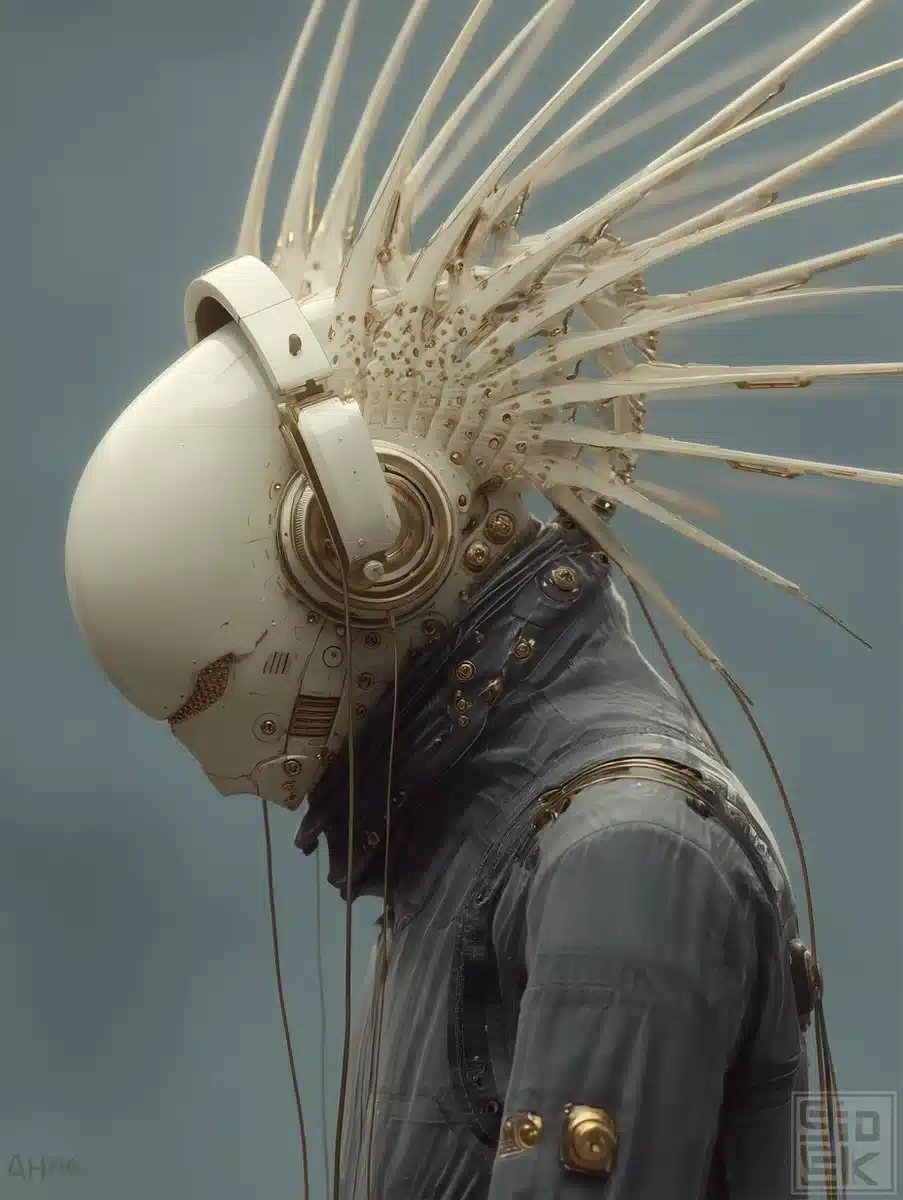
Anteprima Immagine Generata
curl --location 'https://api.legnext.ai/api/v1/diffusion' \
--header 'x-api-key: YOUR_API_KEY' \
--header 'Content-Type: application/json' \
--data '{
    "text": "renderings, mechanized forms, filthy sculptures, dark teal and yellow and dark black, epic art, shroom core, sharp attention to detail Concept art of an abstract, dark white, futuristic, mechanical dragon,angels and wings of light, wings fire, A radiant humanoid figure made of reflective black material, illuminated from within by golden, glowing light particles bursting from the chest. The figure appears ethereal and powerful, standing against a dark blue, cosmic background with dynamic light streaks and sparks radiating outward. The style is hyper-realistic with a futuristic and spiritual aesthetic, capturing a moment of transformation or awakening, vast universe, the huge moon is being melted by the sun. A sculptor wearing an astronaut suit is chiseling the moon **divine lucidity, intricate fractal fabric of time, gradiant teal orange echo chamber of lies, Toroidal energy field visualized as sound waves, ice planet: abstract concentric waves ripple through a dimensional fog, forming a glowing torus that hums with vibration. No physical objects--only pulses, waves, currents. The image captures the feeling of listening to transformation. Vortex of motion, color, and frequency. Spiritual and minimal, rendered in glowing lines and gradients, \"AHK\" initials, like sacred data from a dream. Abstract art, clean and powerful, cinematic lighting, IMAX quality --chaos 55 --ar 3:4 --v 7 --stylize 750 --weird 9"
}'
Nota: Sostituisci YOUR_API_KEY con la tua chiave API effettiva. Ottieni la tua chiave API da la tua dashboard.
Come Usare Questo Prompt
Panoramica
Questo prompt è progettato per generare immagini AI straordinarie usando midjourney. Che tu sia un designer, un artista o uno sviluppatore, questo prompt fornisce una solida base per creare immagini di qualità professionale con parametri accuratamente elaborati per risultati coerenti.
Guida Passo-Passo
- 1Copy the Prompt:Click the "Copy" button above to copy the complete prompt text to your clipboard.
- 2Open midjourney:Navigate to your midjourney interface (Discord bot or web interface).
- 3Paste and Generate:Paste the prompt into the message box and press Enter to start generating your image.
- 4Wait for Results:midjourney will process your prompt and generate multiple image variations, typically taking 1-2 minutes.
- 5Refine if Needed:Use the upscale or variation buttons to refine your favorite results.
Understanding the Parameters
Suggerimenti per la Personalizzazione
Migliori Pratiche
Using with Our API
For developers and businesses looking to integrate midjourney into their applications, our API provides a simple way to generate images programmatically. You can automate image generation, process multiple prompts in batch, and integrate AI image generation directly into your workflow. Check the API Code Example section above for implementation details.
The API handles all the complexity of managing midjourney connections, queuing, and result retrieval, allowing you to focus on building your application. With support for all midjourneyfeatures and parameters, you get the full power of midjourney through a simple REST API interface.
Risoluzione dei Problemi
Domande Frequenti
Vuoi usare questo prompt nella tua app?
Genera immagini con Midjourney API - Nessun account Discord richiesto