
Furry Like Typography Design Midjourney Prompt
Vollständiger Prompt
3D text "LIKE" made of white fur on a red background, in a minimalistic style, with bold typography design, a playful and cute font, a fluffy texture, vibrant colors, high resolution, a professional photograph, natural lighting, soft shadows, low contrast, sharp focus, studio photography, and a simple background. --chaos 10 --ar 16:9 --style raw --profile lpyyvo3Parameter Guide
This prompt uses 3 parameters to control the generation.
Aspect Ratio
16:9Widescreen format - perfect for presentations, YouTube thumbnails, and landscape photography
Cinematic feel
Chaos
10Low chaos - consistent and predictable results across all four grid images
Style Raw
enabledReduces artistic interpretation for more photorealistic, literal results
Best for product photography and precise control
To modify these parameters, copy the prompt above and adjust the values. For example, change --ar 16:9 to --ar 1:1 for a square image.
API-Code-Beispiel
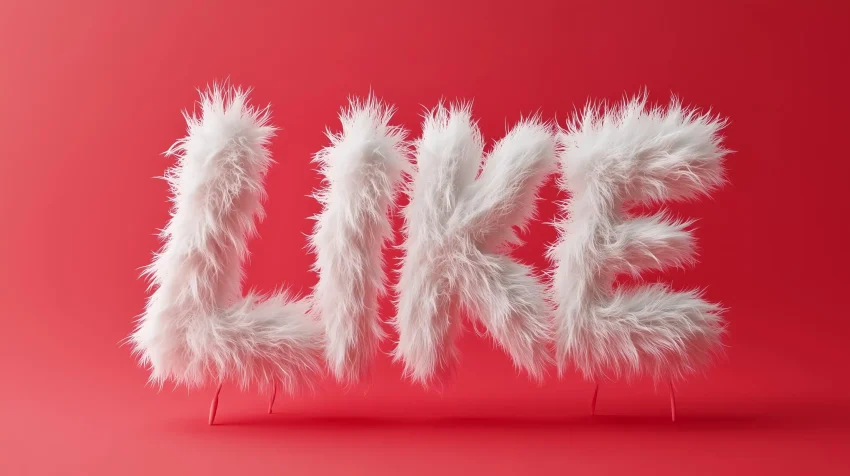
Vorschau des generierten Bildes
curl --location 'https://api.legnext.ai/api/v1/diffusion' \
--header 'x-api-key: YOUR_API_KEY' \
--header 'Content-Type: application/json' \
--data '{
    "text": "3D text \"LIKE\" made of white fur on a red background, in a minimalistic style, with bold typography design, a playful and cute font, a fluffy texture, vibrant colors, high resolution, a professional photograph, natural lighting, soft shadows, low contrast, sharp focus, studio photography, and a simple background. --chaos 10 --ar 16:9 --style raw --profile lpyyvo3"
}'
Hinweis: Ersetzen Sie YOUR_API_KEY durch Ihren tatsächlichen API-Schlüssel. Holen Sie sich Ihren API-Schlüssel von Ihrem Dashboard.
Wie man diesen Prompt verwendet
Übersicht
Dieser Prompt wurde entwickelt, um atemberaubende KI-Bilder mit midjourney zu generieren. Ob Sie Designer, Künstler oder Entwickler sind, dieser Prompt bietet eine solide Grundlage für die Erstellung professioneller Bilder mit sorgfältig ausgearbeiteten Parametern für konsistente Ergebnisse.
Schritt-für-Schritt-Anleitung
- 1Copy the Prompt:Click the "Copy" button above to copy the complete prompt text to your clipboard.
- 2Open midjourney:Navigate to your midjourney interface (Discord bot or web interface).
- 3Paste and Generate:Paste the prompt into the message box and press Enter to start generating your image.
- 4Wait for Results:midjourney will process your prompt and generate multiple image variations, typically taking 1-2 minutes.
- 5Refine if Needed:Use the upscale or variation buttons to refine your favorite results.
Understanding the Parameters
Anpassungstipps
Best Practices
Using with Our API
For developers and businesses looking to integrate midjourney into their applications, our API provides a simple way to generate images programmatically. You can automate image generation, process multiple prompts in batch, and integrate AI image generation directly into your workflow. Check the API Code Example section above for implementation details.
The API handles all the complexity of managing midjourney connections, queuing, and result retrieval, allowing you to focus on building your application. With support for all midjourneyfeatures and parameters, you get the full power of midjourney through a simple REST API interface.
Fehlerbehebung
Häufig gestellte Fragen
Möchten Sie diesen Prompt in Ihrer App verwenden?
Generieren Sie Bilder mit Midjourney API - Kein Discord-Konto erforderlich