Legnext - Midjourney API Platform

Little boy riding a bike in profile view by Norman Rockwell,... - Midjourney V7 Prompt

Little boy riding a bike in profile view by Norman Rockwell, he has a neck chain with a Dice20 how pendant, the background is a Blue turquiose sky wit... | Tags: bike riding, blue sky, children's art

Teilen:

Vollständiger Prompt

Little boy riding a bike in profile view by Norman Rockwell, he has a neck chain with a Dice20 how pendant, the background is a Blue turquiose sky with some clouds --v 7 --stylize 750
version 7stylize 750

Parameter Guide

This prompt uses 2 parameters to control the generation.

Model Version

v7

V7 is the latest and most capable Midjourney model with superior prompt understanding and coherence.

Stylization

750

Maximum stylization - heavy artistic expression, abstract and highly stylized

To modify these parameters, copy the prompt above and adjust the values. For example, change --ar 16:9 to --ar 1:1 for a square image.

API-Code-Beispiel
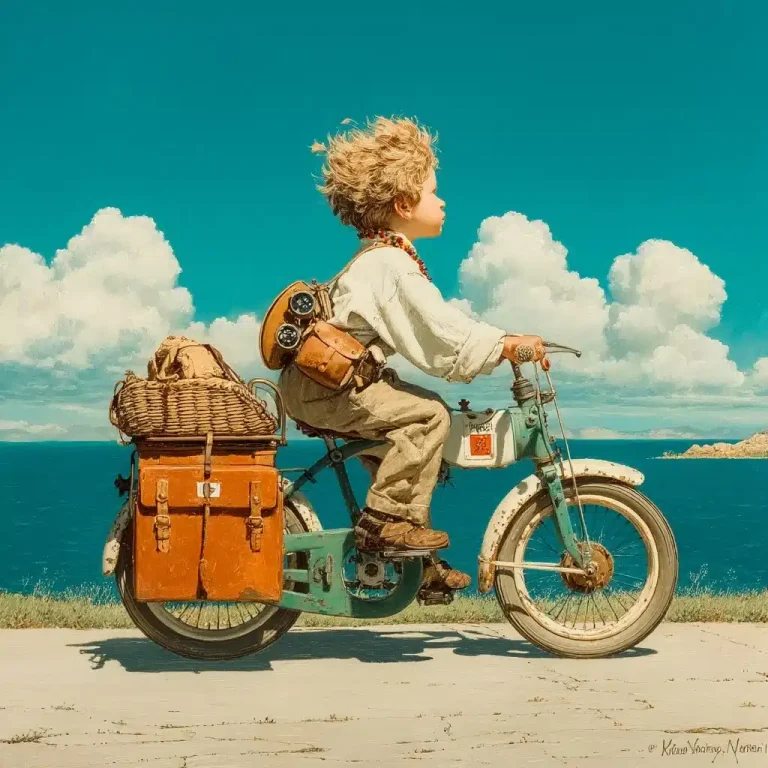
Generated image preview

Vorschau des generierten Bildes

curl --location 'https://api.legnext.ai/api/v1/diffusion' \
--header 'x-api-key: YOUR_API_KEY' \
--header 'Content-Type: application/json' \
--data '{
    "text": "Little boy riding a bike in profile view by Norman Rockwell, he has a neck chain with a Dice20 how pendant, the background is a Blue turquiose sky with some clouds --v 7 --stylize 750"
}'

Hinweis: Ersetzen Sie YOUR_API_KEY durch Ihren tatsächlichen API-Schlüssel. Holen Sie sich Ihren API-Schlüssel von Ihrem Dashboard.

Wie man diesen Prompt verwendet

Übersicht

Dieser Prompt wurde entwickelt, um atemberaubende KI-Bilder mit midjourney zu generieren. Ob Sie Designer, Künstler oder Entwickler sind, dieser Prompt bietet eine solide Grundlage für die Erstellung professioneller Bilder mit sorgfältig ausgearbeiteten Parametern für konsistente Ergebnisse.

Schritt-für-Schritt-Anleitung

  1. 1
    Copy the Prompt:Click the "Copy" button above to copy the complete prompt text to your clipboard.
  2. 2
    Open midjourney:Navigate to your midjourney interface (Discord bot or web interface).
  3. 3
    Paste and Generate:Paste the prompt into the message box and press Enter to start generating your image.
  4. 4
    Wait for Results:midjourney will process your prompt and generate multiple image variations, typically taking 1-2 minutes.
  5. 5
    Refine if Needed:Use the upscale or variation buttons to refine your favorite results.

Understanding the Parameters

Stylize (--stylize):Controls how much midjourney's default artistic style is applied. Values range from 0-1000, with higher values creating more artistic interpretations.
Version (--v):Specifies which midjourney model version to use. Newer versions generally offer improved quality and understanding.

Anpassungstipps

Change the Subject:Replace the main subject with your own concept while keeping the style descriptors.
Adjust Colors:Add or modify color descriptions to match your brand or creative vision.
Modify Style:Experiment with different artistic styles like "watercolor", "oil painting", or "digital art".
Fine-tune Parameters:Adjust the numerical parameters to find the perfect balance for your use case.
Add Context:Include additional details about lighting, mood, or setting to refine the output.

Best Practices

Start with the Base Prompt:Always test the original prompt first before making modifications.
Make Incremental Changes:When customizing, change one element at a time to understand its impact.
Keep a Prompt Library:Save successful variations for future use and reference.
Experiment with Seeds:Use the --seed parameter to maintain consistency across multiple generations.
Use Remix Mode:Enable remix mode in midjourney to easily iterate on successful outputs.

Using with Our API

For developers and businesses looking to integrate midjourney into their applications, our API provides a simple way to generate images programmatically. You can automate image generation, process multiple prompts in batch, and integrate AI image generation directly into your workflow. Check the API Code Example section above for implementation details.

The API handles all the complexity of managing midjourney connections, queuing, and result retrieval, allowing you to focus on building your application. With support for all midjourneyfeatures and parameters, you get the full power of midjourney through a simple REST API interface.

Verwandte Themen

Dieser Prompt ist besonders effektiv für die Erstellung von Bildern im Zusammenhang mit:

bike ridingblue skychildren's artillustrationNorman Rockwellprofile viewv 7

Explore these related topics to find more prompts and inspiration for your creative projects.

Fehlerbehebung

Results don't match expectations:Try adjusting the chaos and stylize parameters, or add more specific descriptive words to your prompt.
Image quality is low:Ensure you're using the latest model version (--v 6 or higher) and consider using upscale features for final outputs.
Prompt is rejected:Check that your prompt doesn't contain prohibited content. midjourney has content guidelines that all prompts must follow.
Generation is slow:During peak hours, midjourney may experience higher load. Consider using fast or turbo mode, or try during off-peak times.

Tags

Häufig gestellte Fragen

Um diesen Prompt zu verwenden, kopieren Sie einfach den vollständigen Prompt-Text und fügen Sie ihn in midjourney ein. Sie können auch unsere API verwenden, um Bilder programmgesteuert zu generieren. Der Prompt enthält alle notwendigen Parameter für optimale Ergebnisse.
Absolut! Sie können jeden Teil des Prompts anpassen, um Ihrer kreativen Vision zu entsprechen. Sie können das Subjekt, den Stil, die Farben oder andere Elemente ändern. Die Parameter (wie --ar, --chaos, --stylize) können auch angepasst werden, um Ihre Ergebnisse zu optimieren.
Häufige Parameter sind: --ar (Seitenverhältnis wie 16:9), --chaos (Variationsstufe 0-100), --stylize (künstlerische Interpretation 0-1000), --v (Versionsnummer), --style (Rendering-Stil). Diese helfen, die endgültige Ausgabe Ihres generierten Bildes zu steuern.
Sie können unsere API verwenden, um automatisch Bilder mit diesem Prompt zu generieren. Senden Sie einfach eine POST-Anfrage an unseren API-Endpunkt mit dem Prompt-Text. Weitere Implementierungsdetails in mehreren Programmiersprachen finden Sie im Abschnitt "API-Code-Beispiel" oben.
Der Prompt selbst kann kostenlos verwendet werden. Die Generierung von Bildern erfordert jedoch entweder ein Midjourney-Abonnement oder die Verwendung unseres API-Dienstes. Unsere API bietet eine bequeme Möglichkeit, Midjourney in Ihre Anwendungen zu integrieren, ohne Discord-Bots zu verwalten.
Die Bildnutzungsrechte hängen von Ihrem Midjourney-Abonnementplan ab. Im Allgemeinen können kostenpflichtige Abonnenten Bilder kommerziell nutzen, während kostenlose Benutzer eingeschränkte kommerzielle Rechte haben. Bitte überprüfen Sie die Nutzungsbedingungen von Midjourney für spezifische Details.

Möchten Sie diesen Prompt in Ihrer App verwenden?

Generieren Sie Bilder mit Midjourney API - Kein Discord-Konto erforderlich